- Originalutgåva
- Föregående avsnitt S01E127 - Restoring Trench Art Lighter from WWI - Book…
- Antal S01E128
-
Externa länkar
YouTube-sida
-
Senaste uppdatering
24 juillet 2023 - 14:20
på 11 databaser
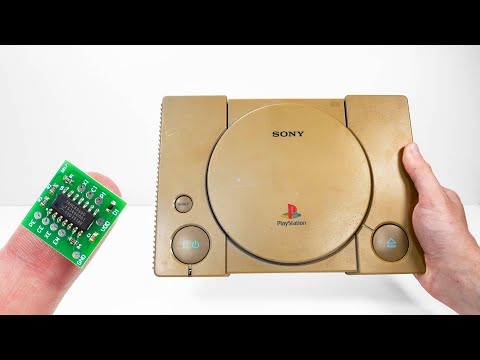
Restoration & Upgrade of PlayStation with a Spider Nest Inside
I will restore and upgrade this broken and yellowed PlayStation. The coinsole doesn't read discs which is very common and easily fixable issue with these old consoles. I also found something a spider nest from the inside.
During the dissasembly I found the remains a of a spider and a spidernest. It's very common I find bugs inside these old devices, I'm, not sure why, maybe they're dark and warm places?
I cleaned the parts with soap and then put them in my retrobrighting box. Here's my tutorial to the retrobrighting: https://youtu.be/jdWRsjnVD3s and tutorial to build the box: https://youtu.be/JX-RJM8MZpU Notice that the original tutorial doesn't need the heater but the lights are touching the box which warms up the solution. Both heat and UV-light seem to aid the process.
Next I installed the upgrade. I got a device called PSIO that allows me to play games from SD cards. This device can onlu be installed to Playstations taht have the Parallel I/O port in the back, not all of them do. You can find the instructions for each board from https://ps-io.com/ and full details on how to set it up. All you need is to add files (the manufacturer provides on that page) to the SD card and put your games on the card. Note that some games may consist of multiple .bin files. Those need to be cobined into single .bin files e.g. with CDMage program. This is a failrly simple modifications and fits someone with a little experience, however, you need a soldering iron with quite small tip to be able to solder them.
To fix the disc drive I opnly had to clean the lens. In some cases teh laser has gone old. You can try adjusting the screw I show to give it more life. It increases the voltage going to the laser and if it's adjusted to the highest voltage at the factory the laser would burn out faster. In this restoration I use similar potentiometer to fix the laser on another Playstation https://youtu.be/8hGGVW_mGEI The idea is the same with this one. If adjusting the laser doesn't work, you need to purchase a replacement part. Or you can just intall an SD card reader and never play games from discs, but I wanted that option too so I repaired it.
Thanks for watching, I hopy you enjoyed the video!
The bellow links to amazon are affiliate links. I get a small fee of anything you buy after clicking them, but you pay no more than without clicking. This is a great way to support my channel.
---------------------------------------------------------------------
Check out my Instagram: https://www.instagram.com/odd.tinkering/
T-Shirts: teespring.com/stores/odd-tinkering-2
Support me on Patreon: https://www.patreon.com/oddtinkering
SOME TOOLS FROM THIS PROJECT:
Screw driver set: https://amzn.to/2P0AmMp
Soldering Iron:https://amzn.to/3qH2ogq
PSIO: https://ps-io.com/store/
Surgical blade: https://amzn.to/3Jfjegx
99.9% isopropyl alcohol (IPA): https://amzn.to/34Po8dX
Prying tools: https://amzn.to/3HkFSmt
Hydrogen peroxide: https://amzn.to/2K5OmTS
---------------------------------------------------------------------
SUBSCRIBE ▶▶▶ https://www.youtube.com/channel/UCf_suVrG2dA5BTjJhNLwthQ?sub_confirmation=1
---------------------------------------------------------------------
#restoration
#repair
#gaming
#asmr
#tech